Columbia College Chicago
Library
Showing posts with label faculty resources. Show all posts

February 25, 2014

What's wrong with that link?

Faculty - have your students mentioned that they are having problems accessing the Library materials you have put online for your class?  Do they get an error message when they try to click on a Library link in your Moodle or OASIS class?  What's the problem with those links?

Well, the problem might be related to something called "permalinks." Access to articles and e-books from the Library's databases require that a special link, a "permalink", be used.  Usually, if you want to include a link to a webpage, you can just copy the URL from the top of the webpage and everything works fine.  Unfortunately, in order to have a link to the Library materials that will authenticate properly and won't time out, you can't use the URL from the top of the browser page.  You need to find the "permalink."

 You can find detailed instructions on how to create "permalinks" to use in your Moodle class in this research guide:  Faculty Tutorials:  Link to Articles in Library Databases.  

In the meantime here is a very quick guide to finding the "permalink" for an article or e-book you want to use in your class.

1.  Locate the article you want to use and click on the title.


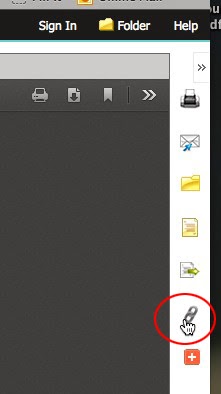
2.  Locate the Permalink Icon and click on it.  Every database is just a bit different so look for something that says Permalink, URL, or some type of link icon. 


 In this example the Permalink icon in on the right-hand side of the page.


 3.  Copy the Permalink.  Use this Permalink with your Moodle or OASIS class or in emails that you might send to your students.  


 As always, if you have any questions or need help finding a "Permalink" you can ASK A LIBRARIAN!


May 20, 2013

Take a class with Lynda this summer!


Looking for something to do this Summer?

Why not brush up on some of your computer skills by taking a class or two with Lynda at Lynda.com?   

Lynda.Com offers over 900 online training courses that cover topics such as photography, business software, web development, graphic design, editing video, sound and much more!  All these videos are available to Columbia College students, staff and faculty free of charge.

Some of the new courses offered at Lynda.com include:
Outlook Web App (OWA) 2010 Essential Training
Learn how to access your Microsoft Exchange account online using Outlook Web App (OWA). In this course, author Gini Courter takes you on a tour of OWA, and shows how to send, receive, and manage your email on the web. Learn the ins and outs of tagging and organizing your email and discover how to create appointments, request meetings, and view multiple calendars. Plus, find out how to add, group, and search for contacts and use the task feature to manage your to-do list effectively.  Duration 3h 27m

InDesign Secrets
In this series, David Blatner and Anne-Marie Concepción, co-hosts of the web's top resource for InDesign tips and tricks, InDesignSecrets.com, share some hidden and sometimes surprising workflow tips that will make working in InDesign more efficient and more fun. The course covers built-in timesaving features such as Quick Apply and auto-expanding text, but also little-known tricks, such as using the eyedropper to copy and paste character and paragraph text attributes and making accurate selections by selecting through or even into objects.  Duration 8h 37m

Enhancing a Travel Photo with Photoshop and Lightroom
Learn how to develop a travel photo into a wonderful memory of your trip in this short start-to-finish project from author Jan Kabili. Jan shows you how to combine the power of Adobe Photoshop and Lightroom to achieve the best possible results from your corrections. The course covers adjusting tone and color, correcting hue/saturation and lightness, precisely targeting adjustments with masks, and removing distracting objects with the Content-Aware toolset in Photoshop.  Duration: 54m 

Use your Columbia Login to view all of the courses available at:  Lynda.com


October 31, 2012

New Electronic Resources in the Library

The Library has recently added some exciting new resources to its electronic collection.  Here are some of the new tools you can use in your online information gathering:


SimplyMap is an award-winning, web-based mapping application that changes the way you use and interact with complex data. SimplyMap enables non-technical and advanced users to quickly create professional thematic maps and reports using powerful demographic, business, and marketing data.  SimplyMap has all the data you need to answer key research questions, make sound business decisions, and understand the socio-demographic and economic conditions of any geographic area in the United States. The database currently offers more than 75,000 data variables related to demographics, employment, housing, market segments, businesses, consumer spending, brand preferences, and public health.

For more information about how to use SimplyMap, click here:  SimplyMap Research Guide


State Stats is a new database from CQ Press that delivers a dynamic and engaging user experience that is unmatched in other resources. Featuring data from more than 80 different government and non-government sources and backed by a rich collection of more than 2,000 current and historical data series on popular topics of research interest, State Stats uniquely allows users to discover, view, and export key information measures for the 50 states and the District of Columbia.

State Stats makes research easy by providing in one place annual measures dating back more than 15 years. Data series are displayed in a clear and consistent format with detailed source information. Numerous topics are covered in categories including: Agriculture; Crime and Law Enforcement; Defense; Demographic; Economics; Education; Employment and Labor; Geography, Energy, and the Environment; Health and Medicine; Social Welfare; Taxes and Government Finance; Teaching and Education; Transportation.

For more information about how to use State Stats, click here: StateStats Research Guide


The Vast: Academic Video Online database from Alexander Street Press currently provides faculty with over 13,000 video titles from a wide range of disciplines, with new titles being added on a regular basis.  By 2013 VAST expects to have over 20,000 films available for faculty and students.

Faculty can easily provide links to high-quality video in their syllabus and embed links or video clips in their Moodle class.  Disciplines covered in VAAST include:  American History; Area Studies; Art and Architecture; Business and Economics; Counseling and Therapy; dance; Education; Ethnic Studies; Ethnograph; Health; Law & Criminal Justice; Opera; Politics and Current Affairs; Psychology; Religion & Philosophy; Science; Theatre; Women  Gender Studies; World History; World Language & Literature.

For more information about how to use the VAST: Academic Video Online Database click here:  VAST Research Guide

August 28, 2012

Faculty - Add the Library to Your Class!

Faculty, as you are putting the final touches on your syllabi and class preparations, don't forget to add  the Library to your class! We have lot's of tools, widgets and gadgets to help make using the Library's resources easy for you and your students.

Schedule your class for a Library Instruction Session or recommend that your students sign up for one of the Monday or Tuesday 11:30 am to 12:00 pm or 12:00 to 12:30 pm Library tours.

Provide your students with direct links to articles, ebooks, and streaming audio and video clips right in your Moodle or OASIS class.

Make resources available to your class by placing them on electronic or print reserve.

Add a library widget to your Moodle course page that will link your students directly to subject/course specific research help.

Find out about these and other services that are available for faculty and students by clicking on the Services Tab on the Library's Home Page.