Columbia College Chicago
Library
Showing posts with label ebooks. Show all posts

April 28, 2014

Lynda.Com and Safari Tech Books Online - A Winning Combination

Did you know that Columbia College students, faculty and staff have access to over 2,500 courses and 116,000 individual videos available from lynda.com absolutely free of charge?  And you have access to over 27,291 e-Books available through Safari Books Online?  So learn new technology, get answers to tricky homework questions or just browse for fun all from the comfort of your home, dorm room or commuter pod.

To access classes at lynda.com simply go to the Columbia College Access Lynda Page.  Students can log in using their OASIS ID.  Faculty and staff log in with the Network ID.  Safari Tech Books can be accessed here .


Some of the new classes available for you to try at lynda.com include:

Job Hunting Online:  Find your next job online! First, get clear on your objectives, and then discover how to use popular job hunting and networking sites such as LinkedIn, CareerBuilder, Monster, Simply Hired, and Glassdoor to locate jobs. Discover how to take advantage of each site's tools for job hunters and learn how to interact with hiring managers and recruiters.  Then take a quick workshop on applying for a job—from finding the ad to researching the company, tailoring your resume and cover letter, and submitting the application.
Safari Tech Books:  Job Hunting 3.0,  Ultimate Job Search

Shooting with the IPhone 5s:  The iPhone has become one of the most popular cameras in the world, and the iPhone 5s offers the best image quality of any iPhone to date. It is also filled with advanced features: two flashes, built-in high dynamic range (HDR) imaging, a burst mode, and a video mode that shoots 120 frames per second slow motion.  In this course, photographer, author, and educator Ben Long explores the iPhone 5s as a serious photographic instrument, using its built-in features as well as a hand-selected collection of accessories and apps that will extend your iPhone power. He details the basics of shooting with the iPhone, and then delves into more advanced camera capabilities such as panoramas, HDR, and video. Ben also explores workflow issues, including editing, sharing, and printing photos and transferring them to a computer.
Safari Tech Books: Capturing Better Photos and Video with your iPhone, iPhone Photography and Video for Dummies

Songwriting in Pro Tools:  Everyone writes songs in their own way. Some start with a melody or a beat, some start with a lyric. Whatever your starting point, you need to get your ideas down quickly, and then polish them into demos worth presenting to partners, producers, and record labels. Pro Tools can help. It's one of the programs professional musicians and songwriters turn to for writing, recording, and mixing songs. In this short course, David Franz takes you from an initial seed-idea to a great sounding demo song, showing you how to find the best tempo, meter, and key; add in vocals, drums, and hooks; and put together a dynamic mix using effects like EQ, compression, and reverb and delay. These 10 simple steps can guide anyone with an idea and a little musical ability through the process of capturing a song idea before the inspiration fades.
Safari Tech Books:  Pro Tools 101, Pro Tools for Dummies


Check out these classes and much more at lynda.com and Safari Tech Books!

May 14, 2012

Kindle Lending Library


What do The Hunger Games, Harry Potter, The Habits of Highly Effective People and Fast Food Nation have in common?  They are all available for you to borrow for free at the Kindle Owner's Lending Library!

What you need
To borrow ebooks from the Kindle Owner's Lending Library you need to own some type of Kindle device and you must be an eligible Prime member (paid Amazon Prime, paid Amazon Student).  Kindle owners can now borrow ebooks from the Lending Library and place them directly onto their registered Kindle Device.


Reading your eBook
The borrowed eBook must be read on a Kindle device - you will not be able to read the ebook on your iPad, iPhone, Android, etc.   There are no "due dates" for your borrowed ebook - you are allowed to keep the ebook as long as you wish.  However, you can only borrow one book at a time and only borrow one free book per month. 


Extras
Bookmarks, notes and highlights are all available through the Lending Library and will be saved to your Amazon.com account.  if you ever borrow or puchase the ebook in the future all of the notes and highlights will be available for you.

For more information about the Kindle Lending Library, click here.  

April 10, 2012

Finding Frankenstein


Looking for Frankenstein?

Are you a First Year Seminar student, looking a free copy of the book Frankenstein?  The library copies may be checked out, but you can still get a free copy of this book!  Just go to Project Gutenberg to access a free digital copy of Frankenstein.  You can read the book online or download an eBook to be read on your personal eReader.  

You also might want to check out this all things Frankenstein glog:  http://mslev.edu.glogster.com/frankenstein/ which has downloadable audio versions of Frankenstein, more links to downloadable eBooks, background information about Mary Shelly, a link to the 1910 silent movie and, of course, the Mary Shelly Frankenstein quiz!


 Steel engraving for frontispiece to the revised edition of Frankenstein by Mary Shelley, published by Colburn and Bentley, London 1831. The novel was first published in 1818.


March 23, 2012

Get Free eBooks!

Picture by Michael Porter


Spring break is right around the corner so what a great time to load up your eReader with FREE eBooks!

Free eBooks

Here is a list of places where you can download eBooks for free:


More Online eBook Resources


Comparison of eReaders

Not sure which eReader to get?  Here are some places that can help you sort out the different options:

Reader Comparison Guide


Do you know a good website for downloading free eBooks?  Please share it with us!

March 19, 2012

eBooks: Add Safari eBooks to your Moodle Class

Safari Tech Books Online is a collection of over 16,000 technology, digital media and business books available free of charge for Columbia College Chicago faculty, staff and students.  These books are great source for reference or supplemental reading and review material for your classes.  And, it’s easy to include links to these online books in your Moodle or OASIS class site for quick access by your students!

Start Reading
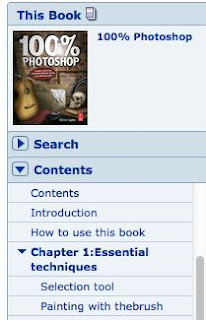
Last week I talked about how to browse the Safari Tech Books Online library and select an eBook to Start Reading.  Once you’ve clicked on the Start Reading button, you will see your eBook displayed in the reader window.  The interactive Table of Contents appears on the left-hand side of the page.  You can move directly to a specific chapter or page by clicking the listing in the table of contents.


Get the Right URL!
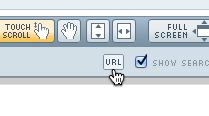
Once you’ve selected the chapter or selection you’d like to have your students read you need to get the correct URL to use in your Moodle class.  There is a URL button in the tool bar across the top of the reader window.

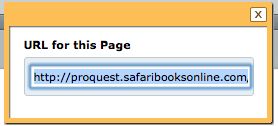
Click on the URL Button and the URL for that particular chapter will be displayed, ready for you to copy and paste into Moodle.


Don’t paste that URL yet!
Before you paste that URL into your Moodle link, it is very important that you add this to the beginning of the URL:

http://emils.lib.colum.edu/login?url=

This will allow your students to view the Safari eBook when they are off-campus.  It makes for a very long URL to paste into Moodle but it’s very important that you remember to add this prefix.  Without this prefix your students won't be able to authenticate into the Safari database.

So, the complete URL you need to paste into Moodle will look something like this:

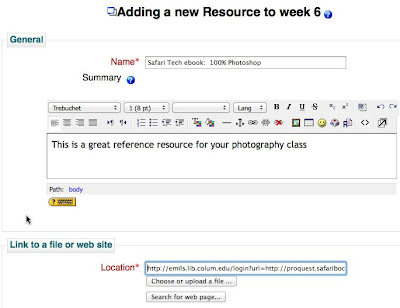
http://emils.lib.colum.edu/login?url=http://proquest.safaribooksonline.com/book/-/9780240814254/chapter-1-essential-techniques/3


On to Moodle:
And here’s what the link will look like when you set it up in Moodle:


And here is what your students will see as they look at their class page: 


Using Safari Tech Books online and Moodle is a perfect way to provide your students with easy access to great online resources!


March 12, 2012

eBooks: Browsing Safari Tech Books

Have you had a chance to browse through the Safari Books Online digital collection yet?  Safari Tech Books Online is a collection of over 16,000 technology, digital media and business books that are available free of charge to Columbia College Chicago faculty, staff and students.

Browse Safari Online
The book selection in the Safari digital library covers a wide range of topics (click here for a complete listing of all the Safari Tech Book categories available).  You can browse for books by category, conduct a keyword search, view recently added titles, most popular titles or scroll through the 16,000 titles listed by date, popularity or alphabetical order.


Start Reading
Once you've found the book you want to read, click the START READING button.


This will take you to a page that contains an interactive table of contents, your eBook text and a selection of tools icons across the top of the page that will help you interact with your eBook.


You can find out more information about eBooks at Columbia here.  Happy Browsing!!


March 5, 2012

eBooks: Safari Books Online


Are you ready to go on Safari?

I’m hoping that you are familiar with the college’s subscription to Lynda.com and are already taking advantage of the hundreds of technology training videos available to Columbia faculty, staff and students free of charge.  But did you know that there are thousands of  technology ebooks available for you use for free through the  Safari Tech Books Online subscription at the Columbia College Chicago Library?

What are Safari Tech Books Online?
Safari Tech Books Online was started in 2001 by O’Reilly Media, Inc. and Pearson Technology Group with the aim of gathering the best technology books available and creating an on-demand digital library.  Today over 40 publishers participate in creating content for this online library of over 15,000 ebooks.  Look for books by publishers such as Adobe Press, Peachpit Press, Microsoft Press, APress, SAMS and more.


What kind of Technology eBooks are available?
One of the advantages of a collection like Safari Tech Books Online is their ability to keep the eBook content up-to-date.  It is easy for Safari to update the online library so that new eBooks can be uploaded as soon as they are released, letting you keep current in your training as software versions change.   You can view a complete listing of eBook categories available which include topics and products that range from Microsoft Office and Adobe Photoshop, to computer programming and Web Design, to accounting and project management, to Skype, Facebook and Twitter.


Where can I find Safari Tech Books Online?
All of the Safari Tech books are discoverable when you search the Library Catalog.  However, if you would like to see just the Safari Tech Book Online collection, click on the Databases A-Z link on the Library’s main page and then scroll down to the Safari Link under the S Tab.


More information about eBooks at Columbia can be found in the eBooks Research Guide.


We'd like to hear from you - faculty are you recommending Safari Tech Books online for your students?  Students - any of your teachers using the Safari Tech Books in your class yet?