Columbia College Chicago
Library
Showing posts with label advice. Show all posts

March 10, 2014

Spring Fever? Now there's a problem we could get behind!

Winter blues are no fun. But what about spring fever?

We went looking for an excuse to day dream about the end of winter and found some facts about a malady some of us are looking forward to.  Spring fever can have a real impact on your day-to-day life.  Forget about snow and sub-zero temps for a minute, and prepare for the glorious problem that sometimes comes with longer, warmer days.

From the Huffington Post Healthy Living section:
Spring Fever: Why You Feel Different With the Change in Season
 

Even Elvis understood the problem!  But it looks like he knew how to deal with it.


February 25, 2014

What's wrong with that link?

Faculty - have your students mentioned that they are having problems accessing the Library materials you have put online for your class?  Do they get an error message when they try to click on a Library link in your Moodle or OASIS class?  What's the problem with those links?

Well, the problem might be related to something called "permalinks." Access to articles and e-books from the Library's databases require that a special link, a "permalink", be used.  Usually, if you want to include a link to a webpage, you can just copy the URL from the top of the webpage and everything works fine.  Unfortunately, in order to have a link to the Library materials that will authenticate properly and won't time out, you can't use the URL from the top of the browser page.  You need to find the "permalink."

 You can find detailed instructions on how to create "permalinks" to use in your Moodle class in this research guide:  Faculty Tutorials:  Link to Articles in Library Databases.  

In the meantime here is a very quick guide to finding the "permalink" for an article or e-book you want to use in your class.

1.  Locate the article you want to use and click on the title.


2.  Locate the Permalink Icon and click on it.  Every database is just a bit different so look for something that says Permalink, URL, or some type of link icon. 
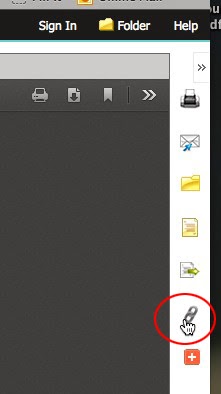


 In this example the Permalink icon in on the right-hand side of the page.


 3.  Copy the Permalink.  Use this Permalink with your Moodle or OASIS class or in emails that you might send to your students.  


 As always, if you have any questions or need help finding a "Permalink" you can ASK A LIBRARIAN!


January 24, 2014

5 Tips for Starting the Semester Off Right


  1. Don't skip the first day of class. You'll find out more information about the class and most importantly get an idea of what the professor expects of you.
  2. Stay organized! Make your planner your best friend this semester and don't miss an assignment! Planners are available at the Columbia bookstore or online. (http://www.bkstr.com/Home/10001-10369-1?demoKey=d)
  3. Ask questions. You'll be glad you got everything cleared up before classes start to get more intense. Visit your professor during office hours. They'll be happy to help!
  4. Be optimistic! Embrace the fresh new start and look forward to it. You can become an even better student this semester! 
  5. Visit the Library. It's a versatile place where you can print your homework, borrow your textbooks, get help with your research, and so much more! 
(Thanks to Jenna Stolz for helping compile this list!)